
MACHINE MONITORING & PRODUCTION DATA
Machine & Process Visibility Solutions.
Make equipment status and production information easier to see and use. elliTek helps you evaluate machine monitoring solutions and technologies for existing machines, new equipment, and connected production areas.
Start with one machine, one recurring issue, or one question your team needs answered.
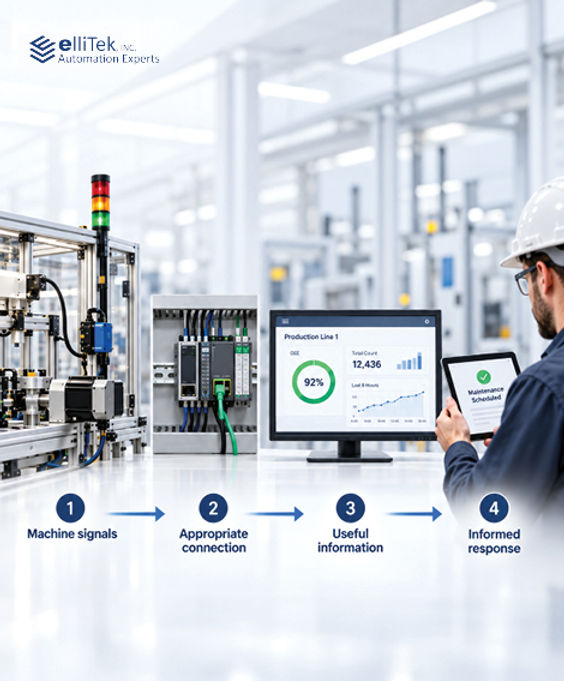
Know what your machines are doing. Know where to focus.
We don't build machines. We support the people who do.
✓ Application Engineering
✓ Authorized Distribution
✓ Local Technical Support
What is machine & process visibility?
Turn machine information into a clearer picture of production.
Machine and process visibility means collecting operating information and presenting it in a useful form. That information may include equipment status, production counts, alarms, process values, and historical trends. The goal is to help people understand what is happening and respond with better context.
A run signal tells you a machine is running. It does not, by itself, tell you whether it is producing good parts at the planned rate.
Start by deciding what you need to know. Then determine which signals, connections, and software functions are needed to answer that question.
What do you need to see?
Focus on information your team can act on.
Depending on the available data and selected platform, monitoring can help your team answer questions such as these:

Operating History
Retain selected production values and alarm records for later analysis. Reporting functions can help turn that history into information for shift reviews and improvement discussions.

Alarms & Events
Make equipment alarms easier to find and review. Match the information presented to the people responsible for responding.

Process Conditions
Bring relevant temperatures, pressures, speeds, or other measured values into an operator display. Trend selected values to support troubleshooting.

Production Counts
Monitor output over a defined period. Compare actual production with a target and distinguish good parts from rejects when those counts are available.

Downtime Patterns
Track when stops occur and how long they last. Add defined reason codes to help separate recurring issues from isolated events.

Machine Status
See which machines are running, stopped, or faulted. Additional states, such as changeover or waiting for material, require the appropriate signals or operator input.
The starting point is not "What can we put on a dashboard?" It is "What business decision should this information help us make?"
Choose a practical starting point.
The right approach depends on the machine and the question.

Start with equipment status
For applications that need basic operating-state visibility, monitoring can begin with suitable machine signals or compatible signaling hardware. Retrofit monitoring approaches can help bring existing equipment into a shared view without assuming that the entire control system must be replaced.
A useful starting point for:
Existing equipment, machine-state tracking, manual workstations, and downtime visibility.

Use the information already in the controls
Where a compatible connection is available, machine data can be presented through an HMI or other visualization platform. Screenless HMI options can separate the data and visualization hardware from the device used to view it.
A useful starting point for:
Machine-level displays, diagnostics, and applications that need access beyond a single operator screen.

Bring multiple machines or process areas together
For broader requirements, a supervisory system can combine information from multiple assets. SCADA can support centralized visualization, alarm management, historical records, and process supervision.
A useful starting point for:
Production lines, multiple process areas, and teams that need a coordinated view across equipment.
These are starting points, not mandatory upgrade stages. Choose the approach that fits the information, users, and operating requirements.
From machine signals to informed response.
Make the information useful before making the dashboard bigger.

Start with a production question.
Which machine is stopping repeatedly? Where is material waiting? What information is missing from the shift review?
Define the data.
Agree on what each machine state means. Identify the source of production counts and determine how downtime reasons will be recorded.
Plan the response.
Decide who needs the information, where they should see it, and what should happen when a condition requires attention.
Validate a focused pilot.
Compare recorded events with what actually happened. Confirm that the information is accurate and useful before expanding the scope.
Process example: A measured value varies between shifts. A focused pilot could record that value and its setpoint, then compare the trends with production events. The team can investigate when the change begins.
Define the required recording rate, timestamp source, retention period, and behavior during communication loss. A display should clearly distinguish current information from stale or unavailable data.
TECHNOLOGY OPTIONS
Technologies that support machine visibility.
Match the technology to the application.
WERMA: Signaling and production monitoring
Weintek: HMIs, screenless platforms, and cloud dashboards
Siemens: Machine visualization and supervisory systems
WAGO: Signal acquisition and controller-based connectivity


Available functions depend on the selected hardware, software, licenses, and setup. Confirm compatibility and access requirements before choose products.
HOW ELLITEK HELPS
Application support for your monitoring project.
elliTek helps you compare products and review application needs, with access to manufacturer support. Your engineering team, machine builder, or system integrator handles system design and implementation.

For existing equipment and MRO projects
Start with the missing information or recurring production issue. Evaluate a focused monitoring approach before assuming a larger controls upgrade is necessary.

For OEMs, machine builders, and CapEx projects
Define machine states and data requirements early. Plan how the equipment will communicate its operating condition and how the customer will use that information.

For system integrators
Review platform options against the project requirements. Clarify product capabilities and identify manufacturer resources needed to support the selected architecture.

Machine & Process Visibility FAQ
Here are some frequently asked questions to help guide you. We are always happy to help!
Can older machines be monitored without replacing the PLC? It may be possible. A status-monitoring approach can use suitable existing signals or compatible retrofit hardware. The available information depends on the machine and the monitoring method. Confirm the electrical interface and required changes before assuming that no control modifications are needed.
Does machine monitoring require the cloud? No. Machine monitoring does not always require the cloud, but some products do. Select a platform whose deployment requirements match the plant’s needs.
What is the difference between an HMI, a dashboard, and SCADA? An HMI commonly supports operator interaction with a machine or local process. A dashboard presents selected information for review. SCADA provides broader supervisory functions that can include multiple assets, alarm management, and historical data. Their capabilities can overlap, so selection should be based on required functions rather than the label alone.
What does “screenless” or “headless” monitoring mean? It means the equipment performing the visualization or data functions does not have an integrated local display. For example, a screenless HMI server can present its application through compatible clients. It still requires appropriate configuration, a supported connection, and a device or application for viewing.
Does machine monitoring automatically provide OEE? No. Overall equipment effectiveness, or OEE, combines availability, performance, and quality. Meaningful calculation requires appropriate inputs, including planned production time, production counts, a valid production-rate or cycle-time reference, and good-part data. A run/stop signal alone does not provide all of that information.
How should remote visibility be handled? Review remote access with the plant’s IT and OT teams. Limit access to what is needed, use appropriate authentication, and avoid unnecessarily exposing industrial equipment to the public internet. Viewing production information and remotely operating a machine are separate requirements that should be evaluated separately.
What would you like to see more clearly?
Start with the machine, the recurring issue, or the information your team cannot easily get today.
Bring a machine model, a description of the problem, or an example of the report you need. elliTek will help you evaluate a practical next step.
Prefer to call? 865.409.1555
From Knoxville, elliTek supports customers in East and Middle Tennessee, Southern Kentucky, Western North Carolina, and Southwest Virginia.